


Cosmo Casino Login and Registration Process for Kiwi Players
To make sure that New Zealand players can create a new gambling account as fast as possible, we’ve decided to make the Cosmo Casino sign-up process very light. As a result, you’ll be able to enjoy your favourite pokies, roulette, blackjack, and other games in a matter of minutes. With 150 chances to become a millionaire presented to every newcomer, you won’t find a more generous welcome offer anywhere else. Read on to find out how you can join our legal NZ casino today.
Registration at Cosmo Casino
The initial step to start your adventure is creating a fresh account. This won’t take more than a few minutes of your time. To enrol, simply follow these steps:
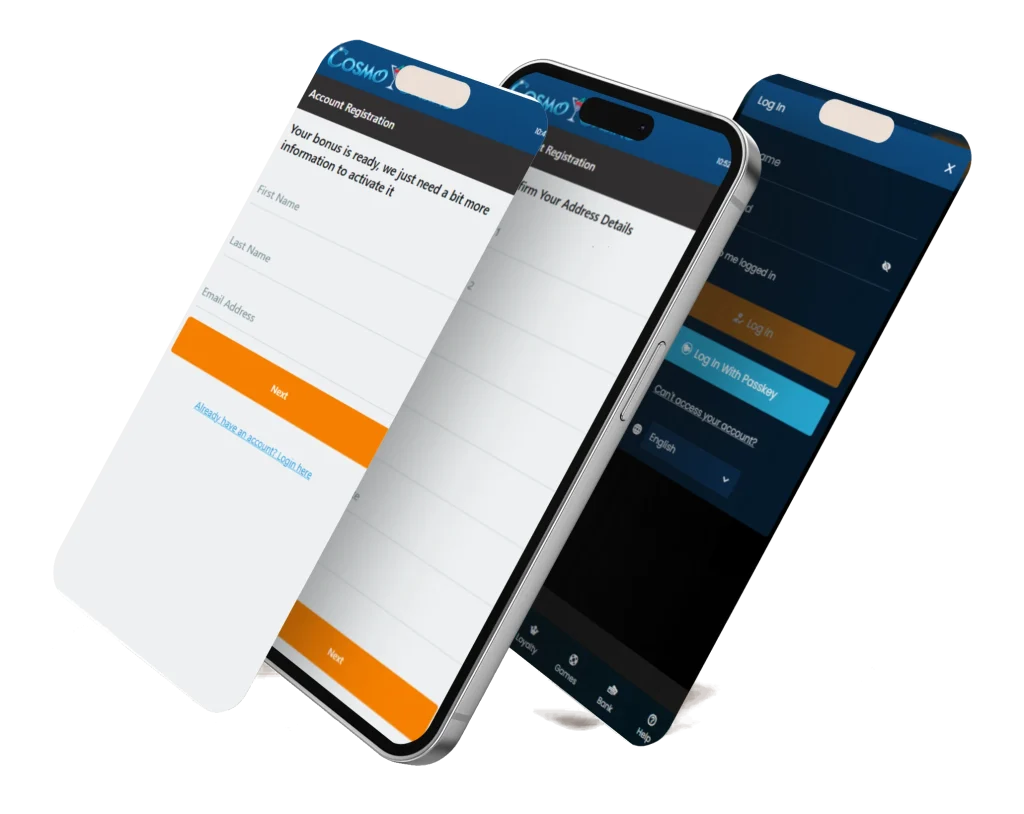
- Reach the site on mobile or desktop.
- Take a look at key information on the main page and hit the “Click Here to Play Now” button.
- Provide information concerning your first and last name, as well as your email address.
- Confirm your date of birth and specify your gender.
- Come up with a strong password (between 4 and 20 characters).
- Fill out both address lines, type in the city name, and the postal code.
- Make sure your country is set to New Zealand and the currency to NZD.
- Enter your valid phone number (+64) and select your occupation from a drop-down menu.
- As the final step, opt in to receive your welcome bonus and other promos and confirm that you’re not underage.
The last screen will show you information about your newly created account. You’ll see your username (automatically generated) and password. Make sure to save that info, as it will be used for every subsequent Cosmo Casino sign-in.
New User Requirements
Not everyone can become a member of CosmoCasino. Here is the list of key requirements outlined in our Terms and Conditions:
- You must be of legal gambling age in New Zealand;
- You must provide accurate and complete personal data during the sign-up process and then keep it up to date;
- You may only open and operate one account;
- You are the only party responsible for maintaining the confidentiality of your account login details;
- You must consent to ID verification, which may require submitting documents like your Kiwi Access Card;
- Your account may be suspended or closed (with funds forfeited) for serious breaches of agreed-upon policies such as providing false info, using bots, or arbitrage.
Welcome Bonus for New NZ Players
All new players have a chance to lock in 150 chances to win big, triggered by a modest deposit of just 10 NZD. You get 150 FS on the Mega Money Wheel slot, each valued at 0.10 NZD. Even with 15 NZD in extra money, it’s possible to win a jackpot.
This introductory promo is made even more advantageous by a second-deposit booster of 100% up to 250 NZD. With additional funds, you can explore our growing library of games with more confidence and, perhaps, even step out of your comfort zone to discover fresh favourites.
The key conditions include a 200x playthrough obligation on the initial two top-ups before the winnings can be withdrawn. This creates an interesting challenge that will keep even the most battle-hardened casino players engaged. Furthermore, we have to note that different game types contribute differently. Slots count 100%, and the rest have lower contribution ratios. Also, crucially, attempting to withdraw your initial 10 NZD forfeits all bonus funds.
Cosmo Casino Login
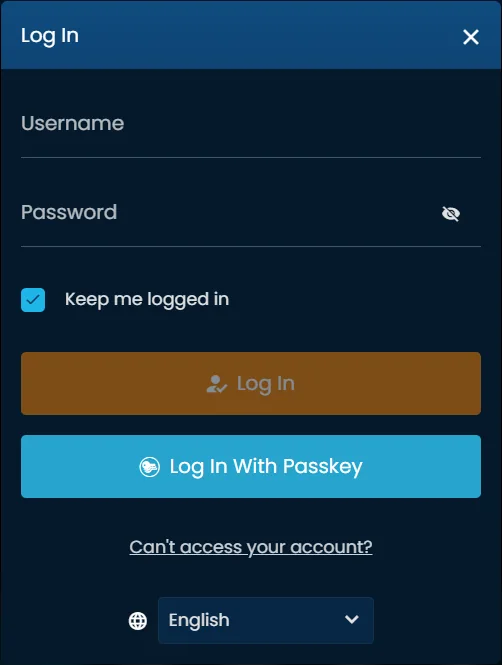
As soon as your registration is confirmed, you’ll be automatically logged in. However, you must be aware of the simple steps required to perform a Cosmo Casino NZ login manually:
- Open the main page on mobile or desktop.
- Click on the red-colored “Login” button at the very top.
- Make use of the next button on our stand-alone login page.
- Click on “Already have an account?” to see the sign-in window.
- Punch in your username and password.
- Complete the process by using the orange button.
There are several additional features that can make this process even simpler. For example, you can use the eye icon to reveal your password as you’re typing it. That can help prevent incorrect password entry, which can be a hassle if you encounter too many failed login attempts.
Moreover, it’s possible for you to sign in with a passkey (you can set it up in the Security section of account settings) and keep yourself logged in by checking a box under the password field. However, keep in mind that you must ONLY use this feature on your personal computer/handheld device.
Mobile Login
Since our casino does not have an application for Android and iOS, your mobile login CosmoCasino process does not deviate much from what was described above. Some interface elements may be re-adjusted thanks to our website’s adaptive nature, but the overall process is still very similar.
Using a touchscreen to enter info may be slightly more tedious, but, according to our testing, it still takes less than a minute to start playing. Also, remember that you are NOT required to create a second account to play on mobile. In fact, it’s an offence to create multiple accounts on our casino site.
Cosmo Casino Online Verification
As a licensed gambling establishment, we are required by New Zealand law to confirm the identities of all users. We reserve the right to request verification at any time deemed necessary, but, most commonly, verification is requested following deposits or after withdrawals. We may request proof of identity, proof of residency (no older than 3 months), and proof of payment method ownership.
All documents must be clear and legible, and in case you fail to comply with such requirements, we may request additional documentation until account confirmation is successful. For any potential questions, you must contact our verification taskforce at [email protected].
Potential Login Issues
Although we have designed our Cosmo Casino online login functionality to be as user-facing as possible, issues still may arise. Here are a few examples with solutions:
1. Incorrect Password
Simply use the password recovery button at the bottom of the sign-in window. Our helpful support staff will guide you through the recovery process.
2. Account Locked
Multiple failed attempts may temporarily lock your account. Wait 20-30 minutes before trying again or contact support.
3. Browser Issues
If you’re sure you’re entering the correct credentials, your browser might be causing a problem. Try cleaning cookies, switching to a different app.
4. Site Maintenance
In case you see an “Under Maintenance” message, just wait and try accessing the website later.
How to Delete a CosmoCasino Account?
There is no “delete account” button in your account settings. We didn’t add it to prevent users from any accidental clicks or attempts at welcome bonus fraud. The only way to close/delete your account is, as stated in Section 9.13 of our Terms, to contact our support team in live chat or via email at [email protected].
Before doing so, you must submit a withdrawal request for any available cash balance you wish to transfer. Be prepared to go through additional checks from our agents since we have to respect the guidelines of responsible gambling and the framework we operate within.